Advanced IP Scanner for Mac: what to use instead
Short answer: there is no Mac version. Famatech ships Advanced IP Scanner as a single Windows executable, and the download page states it is compatible with Windows 11, 10, 8 and 7. No macOS product from Famatech exists that we could find, and the company has not said anything publicly about macOS in either direction.
That leaves three realistic paths: run it through a compatibility layer, run it in a Windows virtual machine, or use a native Mac scanner instead. All three are covered below, honestly, including the free options.
Try DeviceShelf free for 7 days
The App Store app with the same name
Search the Mac App Store and you will find an app called Advanced IP Scanner. It is worth knowing what that is before you download it, because it causes a lot of confusion.
It is not Famatech's product. The listing is published by an independent developer, it is free and carries advertising, and it is an iOS app that also runs on Macs with Apple silicon rather than a native Mac application. It appeared in March 2026. Whether it is any good is a separate question, but it is a different piece of software that happens to share a well-known name, and installing it will not give you the Windows tool you remember.
Famatech itself has no App Store presence we could find. Their site lists Windows products only.
What Advanced IP Scanner actually does
Worth pinning down, because "an alternative to Advanced IP Scanner" means different things depending on which part of it you actually used. Famatech's own feature list names six things: access to network shares, remote control over RDP and Radmin, MAC address detection, switching computers on and off remotely, CSV export, and a portable version that needs no installation.
Its help pages document more: ping, tracert, telnet and SSH launch, Wake-on-LAN (which it notes only works for computers whose MAC address it has identified), remote shutdown, HTTP and FTP links, favourites, export to XML and HTML as well as CSV, and a scan-rate slider.
Two things to note. The current download is version 2.5.4594.1, and the installer file has not changed since 2023, so this is a mature and fairly static tool rather than one under active development. And Famatech does not publish a licence page or system requirements, so if the terms matter for your use, the EULA inside the installer is the only authoritative source.
For most people the parts that matter are the fast sweep, the readable list, and the remote-access shortcuts. The first two have good Mac equivalents. The third is where the platform difference actually bites, and we come back to it below.
Running it with CrossOver or Wine
This works better than you might expect, and most pages covering this question do not mention it at all.
CodeWeavers maintains a compatibility entry for Advanced IP Scanner in the CrossOver database, where it is rated Runs Great on Mac against a recent CrossOver version, with a manual install required. That is CodeWeavers' own rating, not ours, and it is a better result than most Windows utilities manage.
Two caveats sit right next to that rating. A user tip on the same entry reports that behaviour varies noticeably between versions of the scanner, with some producing dead results and others working until they stop unexpectedly. And the PlayOnMac install script for it is explicitly marked as a beta script that "might not work as expected"; its own source carries a note about an ICMP error, hedged by the author as something they were unsure was a real problem.
There is one hard technical limit worth stating plainly, separate from any claim about this particular app: Wine's implementation of SendARP, the Windows call for resolving an IP address to a MAC address, is a stub that returns "not supported". Reading the system's existing ARP cache does work. We have not verified which of these Advanced IP Scanner relies on, so we will not claim that this is the cause of anything, but it is the kind of gap that makes low-level network tools unpredictable under translation.
The honest summary: it may well run, CrossOver is a paid product, and you are depending on a compatibility layer for a tool whose entire job is low-level network access. If it works for you, that is a legitimate answer. If it half-works, you will not enjoy debugging it.
Running it in a virtual machine
More reliable than a compatibility layer, and there is one setting that decides whether it works at all.
Parallels Desktop defaults to Shared networking, where the virtual machine sits behind NAT and shares your Mac's address. In that mode a scanner inside the VM is not a proper peer on your LAN. Switching the adapter to Bridged changes that: Parallels documents bridged mode as making the virtual machine appear as a separate computer on the same subnet as the Mac, able to ping and see the other machines there. VMware Fusion describes its bridged mode the same way.
There is a user report on the Parallels forum from 2022 describing exactly this difference with Advanced IP Scanner specifically: in Shared mode it saw devices but did not collect full details, and in Bridged mode it worked normally. That is a single unanswered post rather than a documented issue, so treat it as one person's experience that happens to match how the two modes are supposed to behave.
On Apple silicon there is an extra layer. A VM there runs Windows on Arm, which emulates x86 and x64 applications, but Microsoft documents that emulation as covering user-mode code only, with no support for drivers. Whether that matters here depends on internals Famatech does not publish.
So: a bridged Windows VM is the most faithful way to keep using the exact tool. It also means running a whole operating system to get a device list.
Native Mac alternatives
Three of these are free, and for a lot of people a free one is the right answer. We build one of the paid tools on this list, so read the last entry with that in mind.
Angry IP Scanner (free)
The closest thing to a direct replacement in spirit: fast, cross-platform, open source under the GPL, and genuinely free. It sweeps a range, resolves hostnames, checks ports, and exports in several formats. The Mac builds bundle their own Java runtime, so there is nothing to install separately, and separate Apple silicon and Intel downloads are provided. Version 3.9.3 arrived in November 2025 with refreshed vendor data, so it is being looked after.
What you give up against Advanced IP Scanner: the remote-access shortcuts. What you give up generally: identification beyond hostname and vendor, and any kind of monitoring. Our fuller take: DeviceShelf compared with Angry IP Scanner.
Nmap (free)
Deeper than anything else here on ports and service detection, free, and distributed under the Nmap Public Source License, which is based on the GPL but adds its own terms. nmap -sn 192.168.1.0/24 is a perfectly good discovery sweep. It is a command-line tool, the learning curve is real, and it does not come with macOS.
LanScan (free tier)
A lean Mac App Store scanner. The free version limits how much of a subnet it shows and the paid unlocks are in-app purchases. Fast, native and cheap, with no identification past the vendor name and no monitoring. More detail: DeviceShelf compared with LanScan.
IP Scanner and Network Radar (paid, one-time)
Two established Mac-native options. IP Scanner has a free tier capped at 15 devices with a one-time upgrade, and leans on manual labelling and icons so your devices stay recognisable. Network Radar is a low one-time price and adds alerts when devices join or leave. Both are cheaper than we are.
Fing Desktop (free tier plus subscription)
Strong identification thanks to a large crowd-sourced database, and the best-known mobile app in this category. The free desktop tier is capped at three scans a day and the monitoring and security features sit behind a subscription. It is cloud-backed by design, which is either the point or the problem depending on what you want. Details: DeviceShelf compared with Fing.
DeviceShelf (paid, one-time)
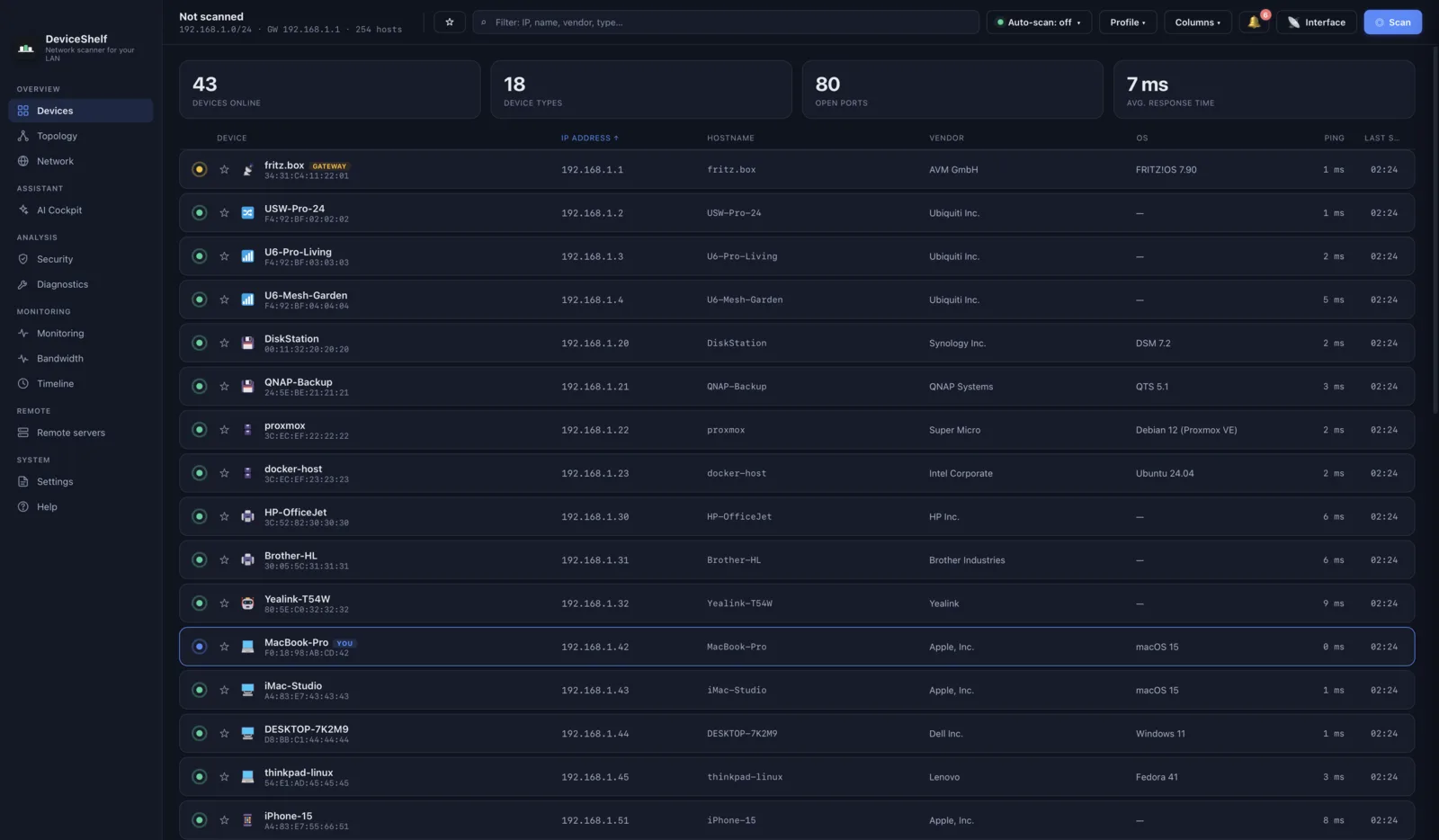
Ours. Native on macOS, Windows and Linux from one licence, with identification that combines vendor data, mDNS and Bonjour, SSDP and UPnP, SNMP, HTTP banners and an offline fingerprint set, plus optional AI and the ability to read your router's client list. It keeps watching afterwards and alerts on new devices. Everything stays local: no account, no cloud sync, no telemetry.
What changes when you move from Windows
A few differences catch people out, and none of them are anyone's fault.
Discovery works differently. Windows networks lean on NetBIOS names; macOS uses Bonjour, Apple's implementation of mDNS, as its native discovery mechanism. NetBIOS is not gone from macOS (Apple documents it as enabled by default for outbound SMB connections), but names you were used to seeing may simply not appear the way they did.
The remote-access shortcuts have no single equivalent. Advanced IP Scanner's one-click RDP and Radmin buttons are the feature Mac users miss most. On macOS the pieces exist separately: Microsoft's Remote Desktop client for RDP, Screen Sharing for Macs, and standard SSH. Several scanners here, ours included, can launch those from a device entry, but it is a different workflow.
macOS will ask permission before any of this works. Since macOS 15 the system shows a Local Network prompt the first time an app tries to reach other devices. Decline it and your scan returns an empty list, which is the single most common reason a first scan looks broken. It lives under System Settings, Privacy and Security, Local Network.
Advanced IP Scanner on Linux
Same answer, shorter: there is no Linux build, only the Windows executable.
The usual replacements are Angry IP Scanner, which ships DEB and RPM packages and needs Java 17 or newer on Linux; Nmap, which is packaged everywhere; arp-scan, a command-line tool that does ARP-level discovery and fingerprinting under the GPL and needs root or the CAP_NET_RAW capability; and NetPeek, a young GTK4 application for GNOME under the GPL, first released in 2025, if you want something graphical and modern.
DeviceShelf also runs natively on Linux under the same licence as the Mac and Windows builds, which is unusual in this category and is the main reason people arrive on this page from a Linux search. See the Linux notes for packaging details.
Side by side
| Feature | DeviceShelf | Advanced IP Scanner | Angry IP | Nmap | LanScan | Fing |
|---|---|---|---|---|---|---|
| Runs on macOS | ✓ | — (Windows only) | ✓ | ✓ | ✓ | ✓ |
| Runs on Linux | ✓ | — | ✓ | ✓ | — | ~ |
| Price | One-time purchase | Free | Free (OSS) | Free (OSS) | Free + IAP | Free tier + subscription |
| Graphical app | ✓ | ✓ | ✓ | CLI | ✓ | ✓ |
| Device identification | ✓ (multi-signal) | MAC detection | — | OS/service detection | Vendor only | ✓ (cloud DB) |
| Remote-access shortcuts | ✓ (SSH/RDP/VNC/SMB) | ✓ (RDP/Radmin/shares) | — | — | — | — |
| Wake-on-LAN | ✓ | ✓ | — | — | — | Paid tier |
| Monitoring & new-device alerts | ✓ | — | — | — | — | Paid tier |
| Works without account/cloud | ✓ | ✓ | ✓ | ✓ | ✓ | Limited |
✓ = yes · — = no · ~ = limited. Checked July 2026 against vendor pages and App Store listings; features and prices differ by tier, region and version.
Where DeviceShelf fits
Advanced IP Scanner is free, so it is worth being direct about when paying for anything makes sense.
If you want a fast sweep and a readable list and nothing more, take Angry IP Scanner. It is free, it is good, and it will still be free later. If you want depth on ports, Nmap beats every graphical tool here including ours, also for nothing.
DeviceShelf earns its price on three things those tools do not do. It works out what each device actually is rather than showing you a vendor prefix, using several signals at once. It keeps watching and tells you when something new appears, with a history of what was connected and when. And one licence covers macOS, Windows and Linux, which matters if you moved from Windows and still have Windows machines around. It is a one-time purchase with a 7-day trial, not a subscription, and nothing it finds leaves your machine.
If you are coming from Advanced IP Scanner specifically, the closest match in feel is a scan button, a readable list and no configuration, which is what we aimed for. The thing you will miss is the one-click Radmin shortcut, and we are not going to pretend otherwise.
Try DeviceShelf free for 7 days See all nine Mac scanners compared
Questions people actually ask
Is there an Advanced IP Scanner for Mac?
No. It is distributed as a single Windows executable and the download page lists Windows 11, 10, 8 and 7. Famatech has not commented publicly on macOS either way, so we will not guess at their plans.
Can I run Advanced IP Scanner on a Mac with CrossOver or Wine?
Possibly. CodeWeavers rates it "Runs Great" on Mac in the CrossOver compatibility database, with a manual install. A user tip on that entry reports version-dependent behaviour, and the PlayOnMac script is marked beta. See the section above.
Can I run it in a Parallels or VMware virtual machine?
Yes, but switch the VM's network adapter to Bridged. In the default Shared mode the VM sits behind NAT and is not a peer on your LAN.
Is the Advanced IP Scanner on the App Store the real one?
No. It is published by an independent developer, not Famatech, and it is an iOS app that also runs on Apple silicon Macs. Same name, different product.
Is there a free Advanced IP Scanner alternative for Mac?
Yes. Angry IP Scanner is free and open source and is the closest free equivalent. Nmap is free and deeper on ports. LanScan has a free tier. None of them identify devices or monitor the network.
Does Advanced IP Scanner work on Linux?
No. On Linux, use Angry IP Scanner, Nmap, arp-scan, or NetPeek for a graphical option. More above.
Why does my scan come back empty on macOS?
Almost always the Local Network permission. macOS asks the first time an app tries to reach other devices, and declining it produces an empty scan rather than an error. Check System Settings, Privacy and Security, Local Network. The other common cause is being on a guest network or a VPN.
What about Advanced IP Scanner versus Angry IP Scanner?
Both are free and both do fast sweeps. Advanced IP Scanner adds the remote-access shortcuts and is Windows-only; Angry IP Scanner runs on all three desktop platforms and is open source. On a Mac the question answers itself. Our comparison: DeviceShelf compared with Angry IP Scanner.
All product names, logos and trademarks are the property of their respective owners, including Advanced IP Scanner and Radmin, which are products of Famatech. Mention here is for identification and comparison purposes only and does not imply any affiliation or endorsement. Feature, licence and price details are gathered from public sources and may change; if you spot something out of date, please let us know.